
LaptopPlan
LaptopPlan

Laptop Upgrade Guide

✅ VerifiedSpecs up to dateChecked Nov 15, 2026
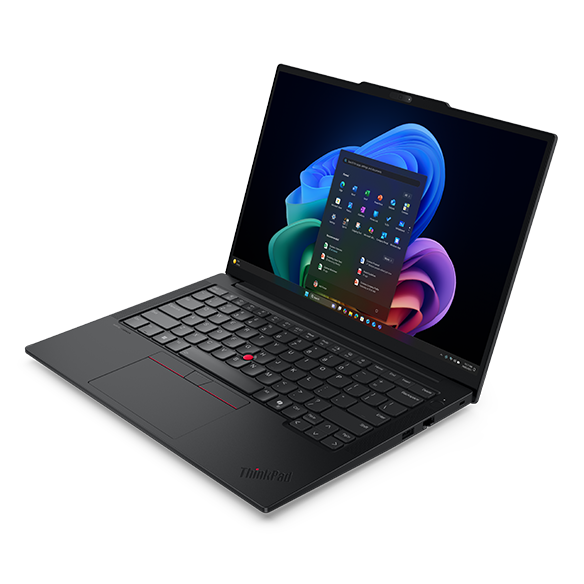
Lenovo ThinkPad E14 Gen 7 14-inch business laptop

Lenovo ThinkPad E14 Gen 7

Model 21T0 / 21SY · Released 2025

Max RAM
32–64 GB (varies by variant)5200/5600/8533 MT/s
RAM Slots
16 GB soldered + 2 SO-DIMM
Storage
2× M.2 2242 / 2280
See Compatible Upgrades ↓

Specs at a glance

Memory Type & Speed (MT/s)DDR5 / LPDDR5X · 5200 / 5600 / 8533 MT/s
RAM Slots16 GB soldered + 2 SO-DIMM
Official OEM Max32–64 GB (varies by variant)
M.2 Form Factor
M.2 2242M.2 2280
Storage InterfacePCIe Gen 4 x4 NVMe
BatteryNot documented

Can you upgrade this laptop?

Memory upgradeability on the Lenovo ThinkPad E14 Gen 7 varies by factory configuration (16 GB soldered + 2 SO-DIMM slots, up to 32–64 GB (varies by factory configuration))—confirm your board's exact soldered vs. slot layout below.

Storage is documented with 2 physical storage slots (M.2 2242, M.2 2280).

All findings below are cross-referenced against 2 cited manufacturer or technical documents.

Configurations & Variant Limits (2)

Maximum memory capacity depends on your motherboard's factory configuration.

Arrow Lake / Raptor Lake / AMD Dual SO-DIMM Configuration

Memory

✅Upgradeable

Maximum 64 GB (32 GB/slot)

DDR5 · 5200 / 5600 MT/s

SO-DIMM

2 RAM slots

Storage

✅Upgradeable / replaceable

2 physical slots

  • M.2 2242 · PCIe Gen 4 x4 NVMe · up to 1 TB
  • M.2 2280 · PCIe Gen 4 x4 NVMe · up to 2 TB

Intel Core Ultra 200V (Lunar Lake) Configuration

Memory

❌Not upgradeable (soldered)

32 GB (factory option only)

LPDDR5X · 8533 MT/s

Soldered LPDDR5X

Storage

✅Upgradeable / replaceable

1 physical slot

  • M.2 2280 · PCIe Gen 4 x4 NVMe · up to 2 TB

Architecture & Compatibility Notes

Lenovo ThinkPad E14 Gen 7 Memory & Storage Architecture

1. Memory Architecture & Channel Design

The Lenovo ThinkPad E14 Gen 7 pairs 16 GB of factory-soldered memory with 2 accessible SO-DIMM slots, carrying an official OEM ceiling of 32–64 GB (varies by variant) (DDR5 / LPDDR5X rated up to 5200 / 5600 / 8533 MT/s). Match the soldered bank's capacity and JEDEC timing to keep the memory controller running in symmetric dual-channel mode rather than asymmetric flex mode.

Because the primary chips are bonded to the system board, check existing soldered capacity in BIOS or Task Manager before ordering a single expansion module.

2. M.2 NVMe Interface & Thermal Clearance

The Lenovo ThinkPad E14 Gen 7 includes 2 M.2 slots wired for M.2 2242 / M.2 2280 over PCIe Gen 4 x4 NVMe (tested up to 2 TB per slot). PCIe NVMe drives are cross-generation compatible—Gen 4 SSDs operate safely at Gen 3 bandwidth in Gen 3 slots—while physical chassis clearance strictly requires matching the M.2 2242 / M.2 2280 standoff length.

Re-seat or transfer any factory copper foil or silicone thermal pad onto the replacement NVMe controller and avoid tall desktop heatsinks that interfere with bottom panel closure.

3. Architecture & Hardware Compatibility Notes

  1. SO-DIMM & M.2 Slot Match

    Memory uses SO-DIMM (DDR5 / LPDDR5X rated up to 5200 / 5600 / 8533 MT/s); storage accepts M.2 2242 / M.2 2280 (PCIe Gen 4 x4 NVMe) drives.

  2. Internal Battery Isolation Before Board Work

    Unplug external power, remove the bottom cover, and disconnect the internal battery header before touching memory latches or M.2 standoffs.

  3. DDR5 Cold-Boot Memory Training

    Allow 30–90 seconds on initial power-on after a memory swap while the DDR5 controller completes first-boot training before entering BIOS.

Need step-by-step installation or OS cloning instructions?SSD Cloning Guide →RAM Upgrade Walkthrough →All Upgrade Guides →

Sources (2)

See an outdated specification or missing sub-model detail? Report a source-backed correction.

Frequently Asked Questions

What is the maximum RAM supported by Lenovo ThinkPad E14 Gen 7?

The Lenovo ThinkPad E14 Gen 7 supports a documented OEM maximum of 32–64 GB (varies by variant) using DDR5 / LPDDR5X at 5200 / 5600 / 8533 MT/s. It uses a hybrid layout combining 16 GB of soldered onboard memory with 2 accessible SO-DIMM slots (upgradeable).

Does Lenovo ThinkPad E14 Gen 7 have an extra M.2 SSD slot for storage upgrade?

Yes. The Lenovo ThinkPad E14 Gen 7 features 2 M.2 slots supporting M.2 2242 / M.2 2280 form factors over PCIe Gen 4 x4 NVMe (documented up to 2 TB), allowing you to add a second SSD without removing the factory OS drive.

What RAM speed and type does Lenovo ThinkPad E14 Gen 7 use?

The Lenovo ThinkPad E14 Gen 7 uses DDR5 / LPDDR5X running at 5200 / 5600 / 8533 MT/s. Because it provides 2 SO-DIMM slots, installing a matched dual-channel pair boosts memory bandwidth and integrated graphics performance significantly.

Is it safe to upgrade the RAM and SSD on Lenovo ThinkPad E14 Gen 7 yourself?

Yes, as long as you follow basic precautions: power the Lenovo ThinkPad E14 Gen 7 completely off, unplug the AC charger, and disconnect the internal battery cable before touching the motherboard. Use a precision Torx/Phillips driver and a nylon spudger so bottom-cover plastic clips do not snap (and under the US Magnuson-Moss Warranty Act, upgrading compatible parts will not void Lenovo's base warranty unless physical damage occurs). Check compatible parts above in Recommended Upgrade Parts (#recommended-upgrades).

Jump to Recommended Upgrade Parts (#recommended-upgrades) →

Helpful upgrade guides

Learn compatibility fundamentals before installing new hardware.

Similar Models

Compare memory limits, SO-DIMM slots, and M.2 NVMe expansion across similar models.

Check your upgrade compatibility

Want to check a specific RAM or SSD capacity for this model? Open the interactive checker with Lenovo ThinkPad E14 Gen 7 pre-selected.

Open Laptop Upgrade Checker